Learn how to shoot stunning 360-degree ring product photography with the right camera, macro lens, lighting, turntable, and editing techniques for jewellery e-commerce.
A ring is small, reflective and three-dimensional, and a single photo only ever shows one side of it. Shoppers want to see the stone from the front, the profile of the setting and the back of the band before they buy, and a 360° ring video lets them do exactly that: the ring turns, and every angle is there.
This guide covers what 360-degree ring photography is, why it helps jewellery e-commerce, the equipment you need, how to shoot a spin step by step, how to light gold, silver and diamond rings, the mistakes to avoid, how to edit and optimise the result for your website, and how to choose a 360° jewellery photography machine. The ring, the videos and the screenshots in this article come from an EasyCLIQ studio.
What is 360-degree ring photography?
In 360-degree ring photography, the ring stands on a motorised turntable while a fixed camera takes a sequence of photographs as it rotates, typically one frame every few degrees. Played in order, the frames become a smooth spin: a looping video, an animated GIF or an interactive viewer that shoppers drag to turn.
Every frame is also a product photo
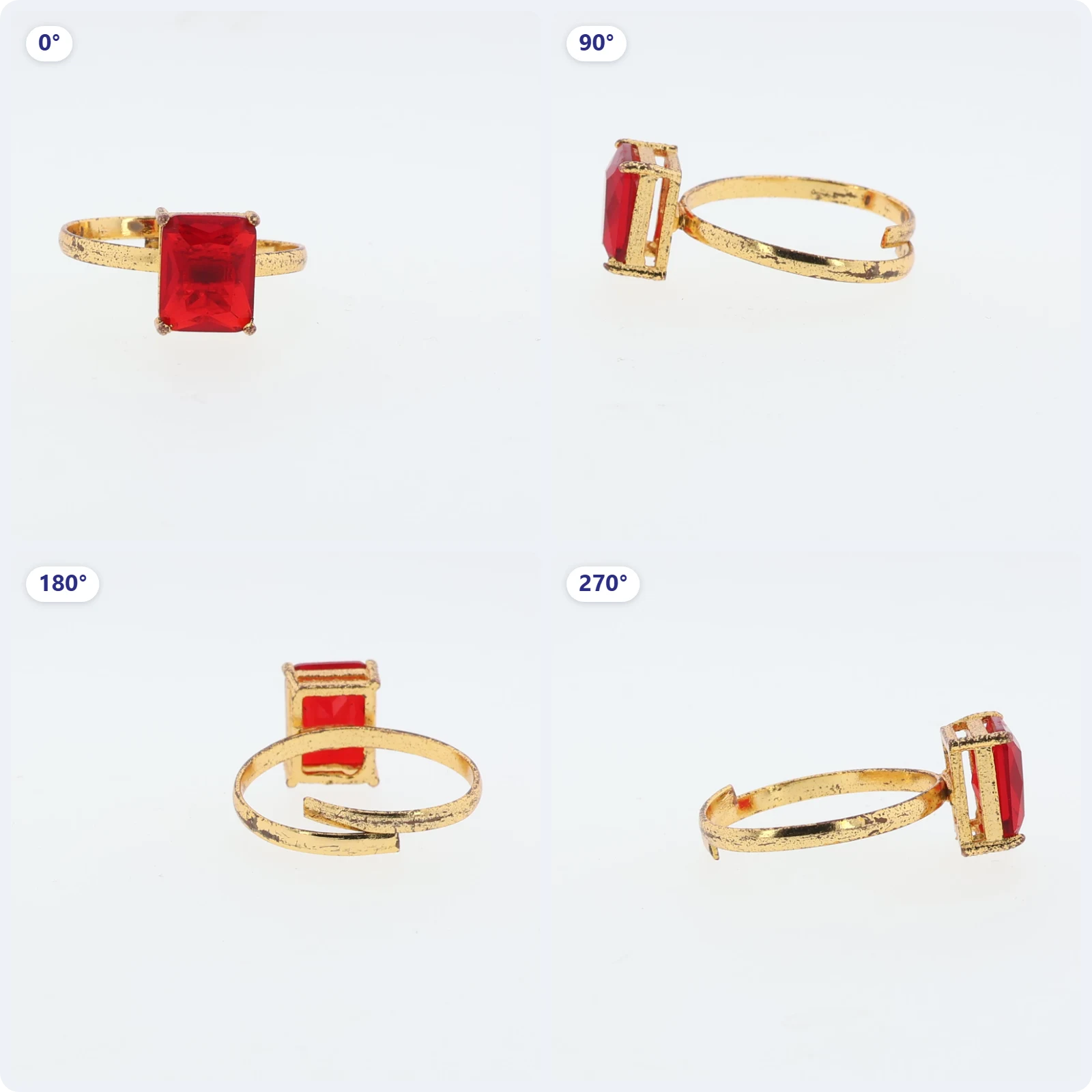
Each frame of a spin is a finished still in its own right. These four show the front of the stone, both profiles of the setting and the back of the band, ready for the listing gallery alongside the spin itself.
Benefits of 360° ring videos for jewellery e-commerce
Every side of the ring
Shoppers see the stone, the setting, the profile and the band in one view, instead of guessing from a single front photo.
Confidence before buying
A ring that turns in front of the buyer answers the questions a flat image leaves open: how high the stone sits, how the band is shaped and what the back looks like.
Listings that catch the eye
Movement stands out on a product page, in a marketplace listing and in a social feed.
One shoot, many outputs
The same capture gives you a spin video, a GIF and a set of still angles for the listing gallery.
A consistent catalogue
With the same turntable speed, frame count, lighting and framing on every ring, a whole collection looks uniform.
Essential equipment for 360° ring photography
DSLR or mirrorless camera
A camera you can control manually and from a computer, so exposure, focus and white balance stay locked for every frame. EasyCLIQ works with Canon DSLR and mirrorless cameras connected over USB.
Macro lens
Rings are small. A macro lens lets the ring fill the frame and records the detail of the setting, the stone and any hallmark; a small aperture or focus stacking keeps the whole ring sharp.
Motorised 360° turntable
A turntable that rotates in precise, even steps, so the spin is smooth and repeatable. Mark its centre, so every ring sits on the axis.
Diffused lighting and a light tent
Polished metal reflects everything around it. An enclosed, evenly lit space, a light tent or a closed studio, keeps reflections soft and the background clean all the way round.
Photography software
Software that fires the camera in step with the turntable, keeps every setting identical, removes the background and exports the spin as video and GIF.
All of it in one studio
An automated jewellery studio brings all five together. In the EasyCLIQ MINI, the camera sits on a fixed precision mount facing the turntable, the high-CRI lights, adjustable from 3000K to 6000K, are built into the chamber, and the software runs the capture and produces the 360° GIF and spin video.
How to shoot a 360° ring product video, step by step
01
Clean and prepare the ring
- Clean: Polish the ring and remove dust and fingerprints, then handle it only with gloves.
- Check: Look for loose stones or bent prongs: every flaw shows from some angle of the spin.
02
Centre the ring on the turntable
- Centre: Place the ring exactly on the turntable’s axis, so it turns on the spot instead of swinging across the frame.
- Stand: Use a small clear ring stand or a dab of jewellery wax to hold it upright at the angle you want.
03
Set the camera manually
- Exposure: Use manual mode with a fixed aperture, shutter speed and ISO, so the brightness does not flicker between frames.
- Focus: Focus manually on the stone, and use a small aperture or focus stacking to keep the band sharp too.
- White balance: Fix the white balance to your lights, so the gold stays the same colour all the way round.
04
Light the ring
- Even light: Light from several sides through diffusion, so no angle falls into shadow as the ring turns.
- Reflections: Keep the camera and anything dark out of the reflections on the band.
05
Capture the rotation
- Frames: Choose the number of frames per rotation: 24 to 36 is a common balance between smoothness and file size, and more frames give a smoother, heavier spin.
- Shoot: Let the turntable and camera run the full 360°, then check that the last frame leads back into the first for a seamless loop.
06
Review and export
- Review: Play the spin back and look for wobble, flicker or a frame out of focus before you move on to the next ring.
- Export: Export a looping MP4 for your website, a GIF where video is not accepted, and keep the best stills for the product gallery.
Best lighting setup for gold, silver and diamond rings
Yellow and rose gold
Warmer light, around 3000K, brings out the richness of gold. Keep it diffused so the band glows rather than burning out to white.
Silver, white gold and platinum
Cooler, neutral light, towards 6000K, keeps white metals crisp and clean, without a yellow cast.
Diamond rings
Soft, diffused light for the metal plus one or two small, harder points of light for sparkle. A cooler temperature keeps white stones bright.
Coloured stones
High-CRI light (90+) keeps a ruby, emerald or sapphire its true colour from every angle. Keep strongly coloured surroundings out of the reflections.
Common mistakes and how to avoid them
- Ring off-centre: it swings across the frame instead of turning on the spot. Centre it on the turntable’s axis before you shoot.
- Auto exposure or auto white balance: brightness and colour flicker from frame to frame. Lock everything in manual.
- Too few frames: the spin looks jerky. Use enough frames for a smooth loop, and check it at full size.
- Only the stone in focus: the band goes soft as it turns away. Use a smaller aperture or focus stacking.
- Reflections of the room and the camera: enclose the set and use diffusion, so the band reflects only soft light.
- Dust and fingerprints: every speck is visible from some angle. Clean the ring and wear gloves.
- Heavy files: a large spin slows the product page down. Export a compressed MP4 at a sensible size, as below.
Editing and optimizing 360° ring videos for websites
- Use MP4 (H.264) for the spin on your own website: it is far smaller than a GIF of the same length and plays in every modern browser. The spin at the top of this article is a 10-second, 720 × 720 MP4 of about 400 KB.
- Keep a GIF for places that only accept images, such as some marketplaces and email newsletters.
- Size it for the page: 720 to 1080 pixels square is plenty for a product page, and anything larger only slows it down.
- Make it play quietly: muted, looping and inline, so phones play it in place without opening a full-screen player.
- Add a poster frame, a still of the first frame, so the page shows the ring before the video loads.
- Crop and centre consistently, with the ring filling a similar part of the frame across the whole catalogue.
- Use a white or light background for marketplaces, and keep a styled version for social media.
Finishing ring images in EasyCLIQ Photo Edit
The frames of a spin double as product photos. These are finished in Photo Edit, the editor built into the EasyCLIQ software.
01
Choose a background or scene
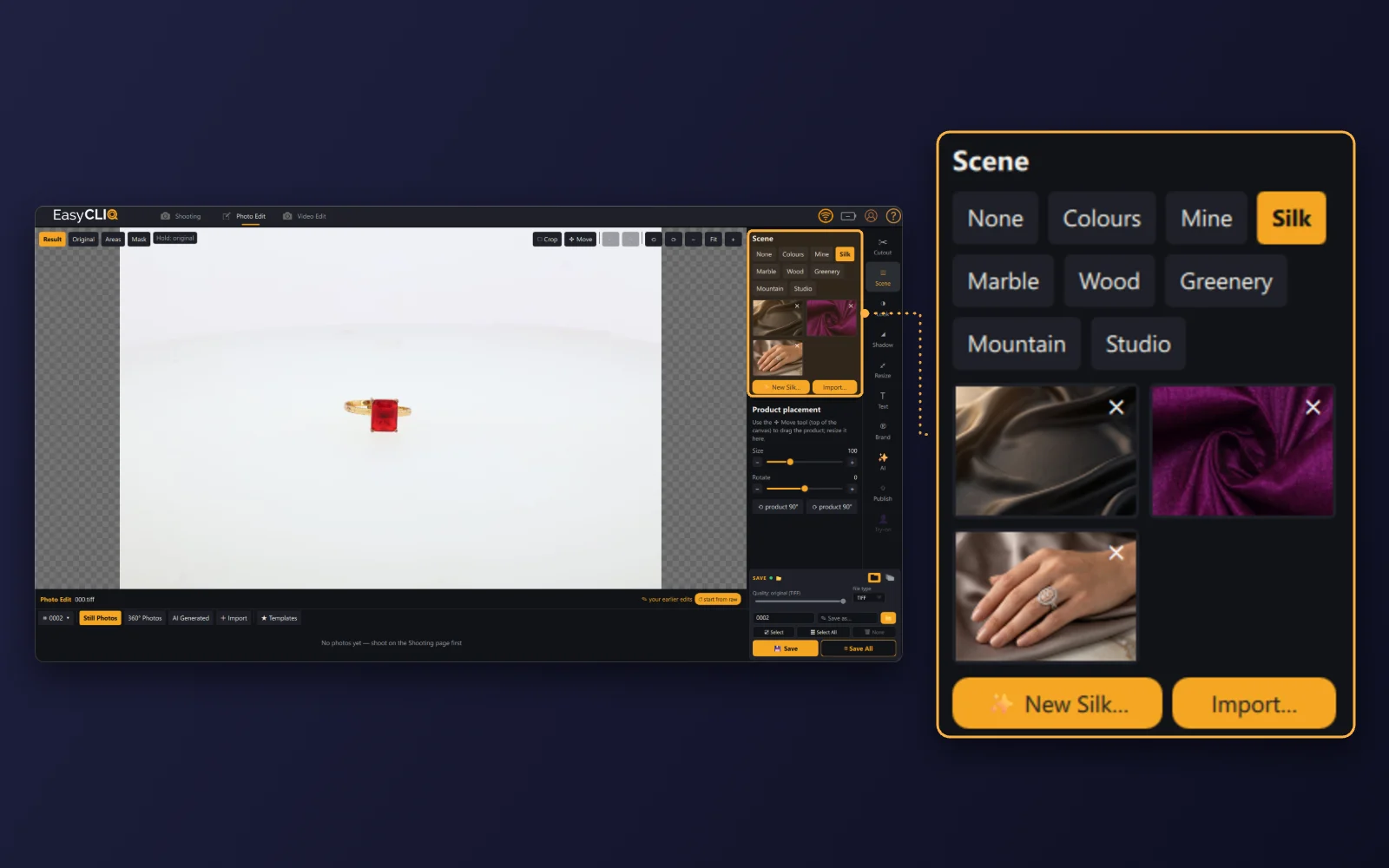
- Scene: Keep a clean background for marketplaces, or switch to Silk, Marble, Wood, Greenery, Mountain or Studio for social media.
- Placement: Drag the ring with the Move tool, and set its size and rotation.
02
Resize for every channel
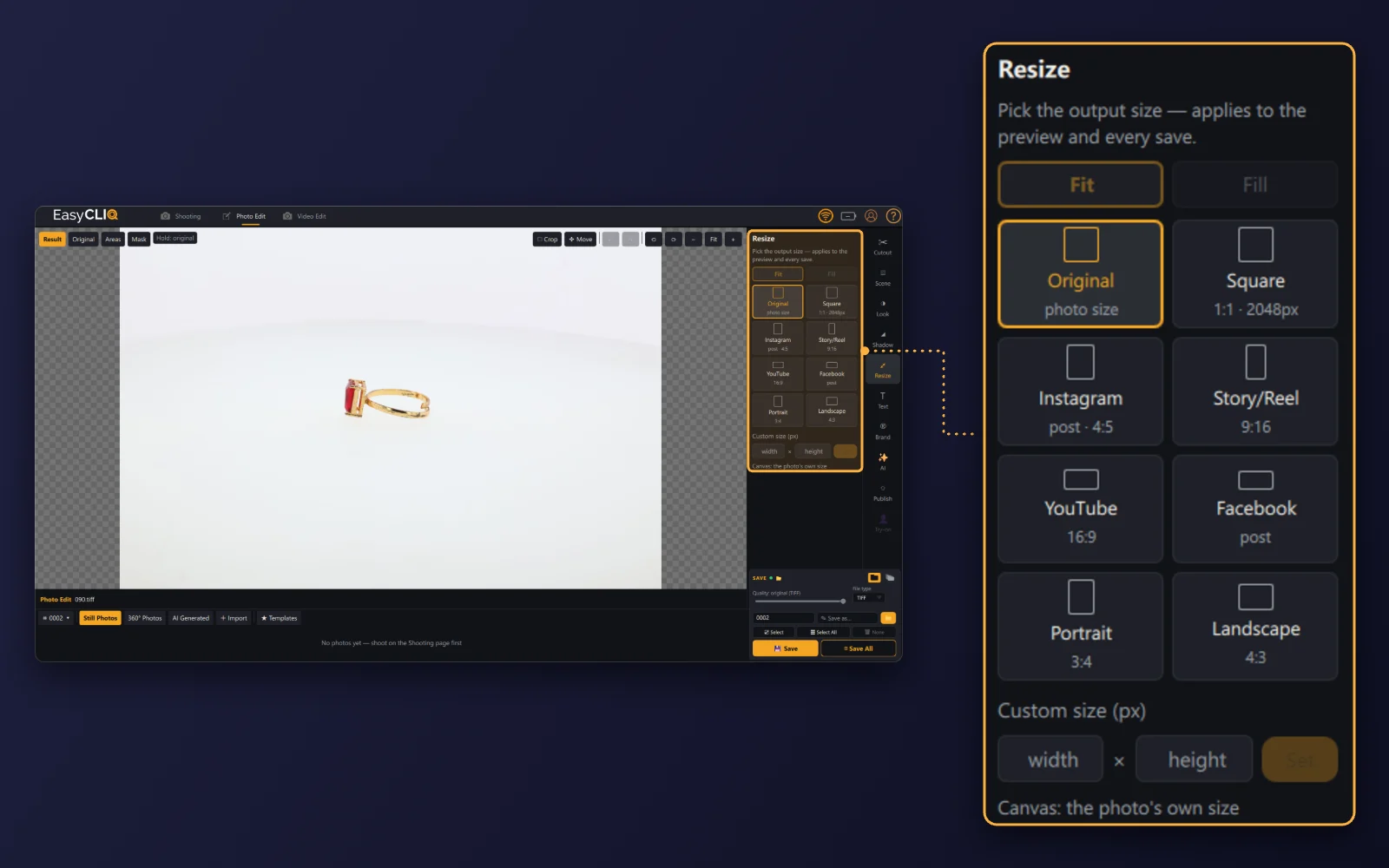
- Presets: Pick an output size: original, square (1:1, 2048 px), Instagram post (4:5), Story or Reel (9:16), YouTube (16:9), Facebook post, portrait (3:4) or landscape (4:3), with Fit or Fill.
- Custom: Or enter your own width and height. The size applies to the preview and to every save.
03
Add product details
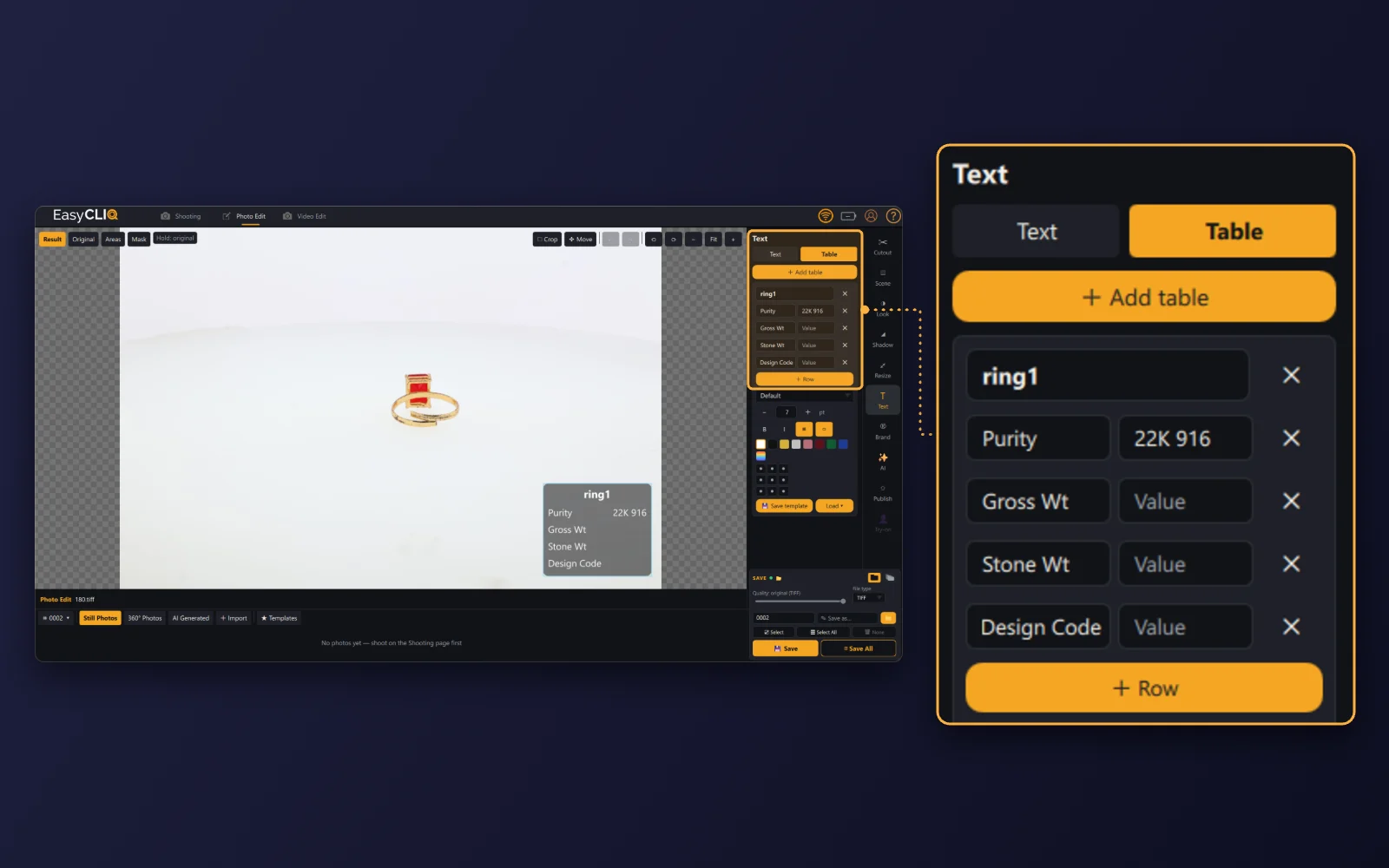
- Table: Add a table to the photo with the details buyers ask for: purity (22K 916 here), gross weight, stone weight and design code.
- Template: Choose the font, size, colour and position, and save it as a template for the next ring.
04
Create lifestyle shots with AI Studio
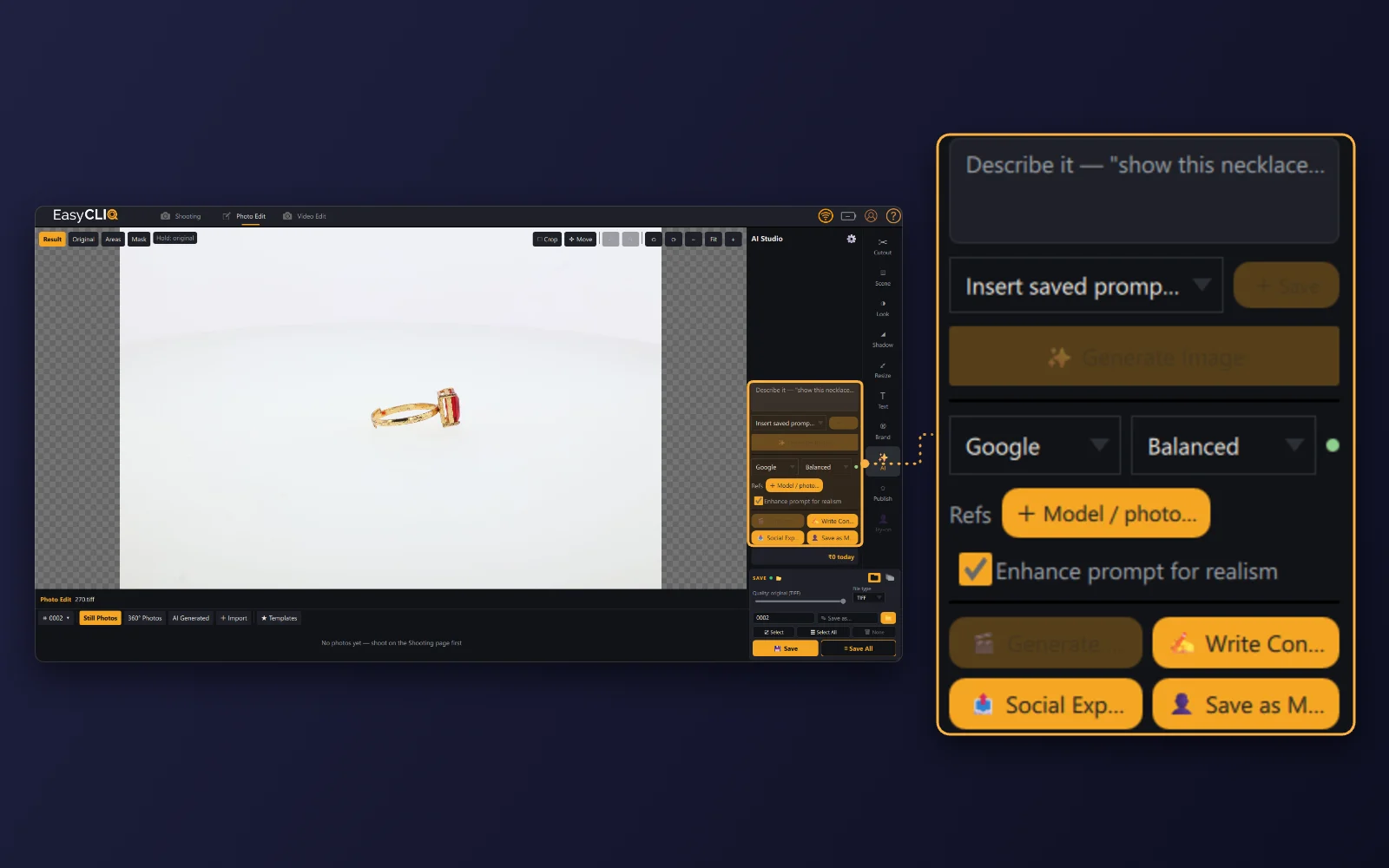
- Describe: Describe the shot you want, such as the ring on a model’s hand, and AI Studio generates it from your photo.
- Refine: Add a model or reference photo, and tick “Enhance prompt for realism” for a more natural result.
Choosing a 360° jewellery photography machine
If you photograph rings every week, an automated 360° studio pays you back in time and consistency. When you compare machines, check that the turntable is precise and the camera stays fixed and fully controlled; that the lighting is high-CRI and adjustable; that the software outputs MP4 and GIF spins as well as stills, with background removal and focus stacking built in; and that installation, training and service are available locally.
EasyCLIQ offers four options. The MINI (₹1,95,000) is a compact studio with top and bottom turntables that produces 360° GIFs and spin videos. The HOLO (₹4,45,000) is a dedicated 360° spin studio with a controllable 0–10 RPM turntable. The X1 (₹8,85,000) and X3 (₹10,85,000) add a robotic camera and cinematic video, for everything from rings to bridal sets. Prices exclude taxes, freight and service charges.
For a full comparison, including other brands, see our buyer’s guide to the best jewellery photography machines in India, linked below.
FAQ: 360° ring photography
How many frames do I need for a 360° ring spin?
Enough for a smooth loop: 24 to 36 frames per rotation is a common balance between smoothness and file size, and 72 gives an extra-smooth spin. Whatever you choose, use the same number across the catalogue.
Should I use a GIF or a video for a 360° ring?
Use an MP4 video on your own website: it is much smaller and sharper than a GIF of the same spin. Keep a GIF for platforms that only accept images.
Do I need a macro lens for ring photography?
For close detail, yes. A macro lens lets a small ring fill the frame and records the setting, the stone and any hallmark. Combine it with a small aperture or focus stacking so the whole ring is sharp.
Can I shoot 360° ring videos with a phone?
You can make a basic spin with a phone and a turntable, but exposure, focus and colour are hard to keep identical across frames. A camera you control manually, or an automated studio, gives consistent, catalogue-ready results.
Turn every ring into a 360° view
A good 360° ring video comes down to a centred ring, locked camera settings, soft and even light, enough frames for a smooth loop and a light, well-sized file on the page. Get those right once, save them as a template, and every ring in the collection can follow.
Book a free demo and we will capture a 360° spin of a ring from your own collection.